Problem:
All my BizTalk 200 R2/Visual Studio 2005 solutions were correctly converted to BizTalk 2010 / Visual Studio 2010 with the exception of one solution where the conversion failed with the following error message:
"Error converting project file. The element <BIZTALK> beneath element <VisualStudioProject> is unrecognized."
It was not a problem with the BizTalk 2010 Developer SDK installation as I succeeded in converting other solutions.
People on the Internet accused the Development/Deployment/Debug/Release solution configurations to be the problem. The correction of my solution configuration did not resolve the conversion problem.
Solution:
Finally, after struggling about half a day, I tried the conversion using the Visual Studio /Upgrade command line and this worked !
devenv "MyBizTalk2006R2VS2005Solution.sln" /Upgrade
Cheers
Thursday, 17 July 2014


Friday, 11 July 2014
VDProj to WiX Converter error: A generic error occurred in GDI+
Error: VDProj to WiX Converter error: A generic error occurred in GDI+
Cause: WIX files found in TFS were not checked out. The following link http://stackoverflow.com/questions/11316322/bitmap-save-a-generic-error-occurred-in-gdi makes me think that bitmap files in WIX folders were not checked out.
Solution: After checking out all WIX folders and files and I successfully converted my VdProj to WIX
Cause: WIX files found in TFS were not checked out. The following link http://stackoverflow.com/questions/11316322/bitmap-save-a-generic-error-occurred-in-gdi makes me think that bitmap files in WIX folders were not checked out.
Solution: After checking out all WIX folders and files and I successfully converted my VdProj to WIX
Wednesday, 2 July 2014
WIX - error ICE30 The target file ... is installed in ... by two different components on an LFN system
Problem: I was getting the follwing error while building one of my WIX projects:
error ICE30 The target file ... is installed in ... by two different components on an LFN system
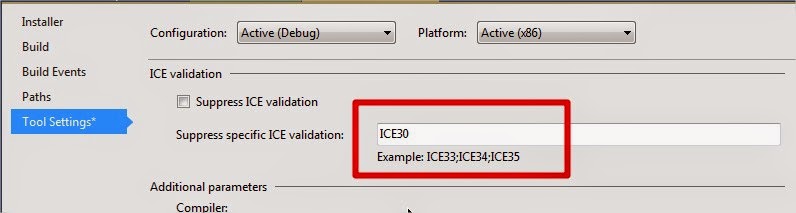
Solution: After investigating, it turns out that I had two files with the same name which were being included in the installation package. In my case, I could ignore this error by doing the following actions on my WIX project:
1. Right-click on the WIX project, choose properties
2. GO to the "Tools Settings Tab"
3. In the "Suppress specific ICE Validation", type "ICE30"
error ICE30 The target file ... is installed in ... by two different components on an LFN system
Solution: After investigating, it turns out that I had two files with the same name which were being included in the installation package. In my case, I could ignore this error by doing the following actions on my WIX project:
1. Right-click on the WIX project, choose properties
2. GO to the "Tools Settings Tab"
3. In the "Suppress specific ICE Validation", type "ICE30"
Subscribe to:
Posts (Atom)